I’m trying to transfer an item in NetSuite to WooCommerce. All the items contain an image. All the other item fields other than image get synced when I map them. WooCommerce does not accept NetSuite URLs and many other types of URL, and im passing the item image url in the field mapping. So is there any other way of syncing images between NetSuite and WooCommerce.
Based on WooCommerce’s docs, you can set product images in two ways:
- Pass an image URL in the
imagesarray (e.g."src": "https://example.com/file.jpg"). This only works if the file is publicly accessible. NetSuite files usually aren’t served over a CDN, so I wouldn’t rely on that approach. - Pass the ID of an image that already lives in WordPress/WooCommerce. This is usually the better option when syncing from NetSuite.
The flow would be:
-
Upload the image to WordPress using the Media endpoint
POST /wp-json/wp/v2/media
(docs: WordPress Media REST API)This will give you a media
idandsource_url. -
Reference that media
idwhen creating or updating your WooCommerce product
POST/PUT /wp-json/wc/v3/products
(docs: WooCommerce Products API)Example:
{
  "images": [
    { "id": 12345 }
  ]
}
That way, the image is properly stored and served by WordPress/WooCommerce, and you don’t need to expose NetSuite files publicly.
Yes, Thank You. But the issue lies when I want to sync multiple item in Netsuite to WooCommerce. As the images are within the item records of Netsuite I would like to sync that in one go through the flow. As you said it doesn’t accept NetSuite URLs, so the only option would be to send the image itself directly through the endpoint but I’m not able to retrieve a jpeg file through celigo export.
I'm not understanding what your issue is. Are your images attached as media to the item? Are they urls in custom fields on the item? You could make a lookup step in your flow to look up the attached media, then download the media, and subsequently, make steps in your flow to upload it and ultimately link the uploaded ID to the product import.
It may be better to even have a custom record made to hold the IDs created, which link to the file cabinet item, so that you don't keep uploading images every time. I don't think you can add custom fields to file records to hold that information.
Yes, my images are attached as media in my item record in NetSuite. So since I can’t export the image itself, like you suggested I used a lookup to extract the raw binary, I’m able to extract it but invalid media type error occurs. If I can just send the raw binary data to export I could try sending it through the wooCommerce api endpoint.
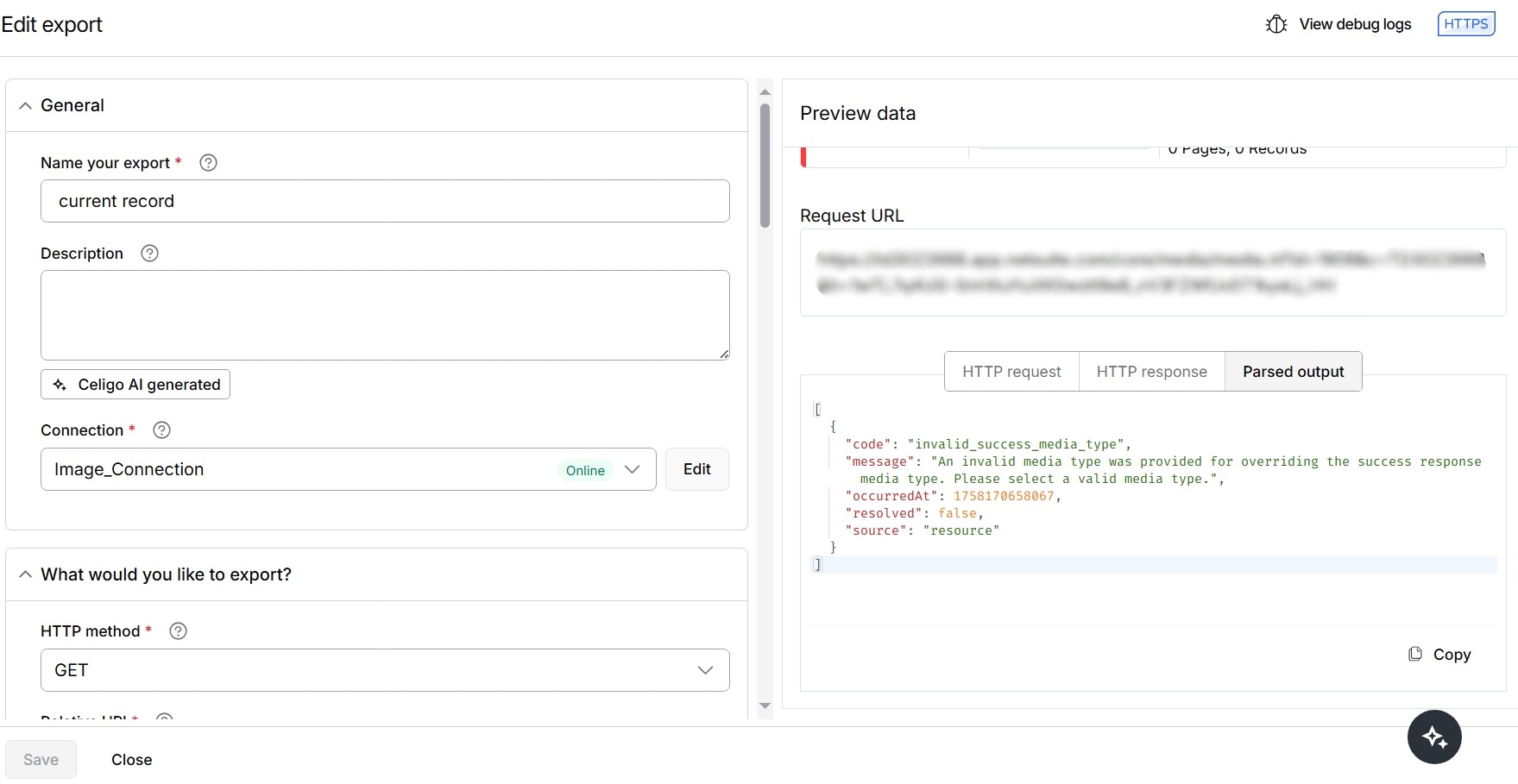
Why not use NetSuite as the lookup step and choose "lookup additional files (per record)"?
I have tried using a lookup to extract file but I'm not able to retrieve the blob key since its an image file,maybe because Celigo cannot retrieve image file. When I tried passing blob key to the import using transformation it returned null.So the issue still remains in extracting an image and passing it to the import. Since the api media endpoint accepts only raw binary data I need the blob key.
You need to have these flow steps:
- NetSuite export that exports items
- NetSuite lookup of records where you do a folder search type to find the list of images for the item (you could do this in step 1 as well, but then need to use group by function and then transform)
- NetSuite lookup additional files using one to many where you pass the file id to it and get a blob key in return
- Upload those files to WooCommerce
- Add/update items in WooCommerce with reference to the image ids