We have a requirement to sync the Shopify Draft orders to NetSuite as Sales orders. As this is not achievable by the integration we plan to use a custom flow. However, it’s noticed that in Shopify once these Draft orders are converted to Regular Orders, the integration app Order flow will pick up it and sync to NetSuite as Sales order. This will lead to 2 sales orders in NetSuite. Is there any way to exclude the Shopify orders created from Draft orders in the Order sync?
Good day Aishwarya!
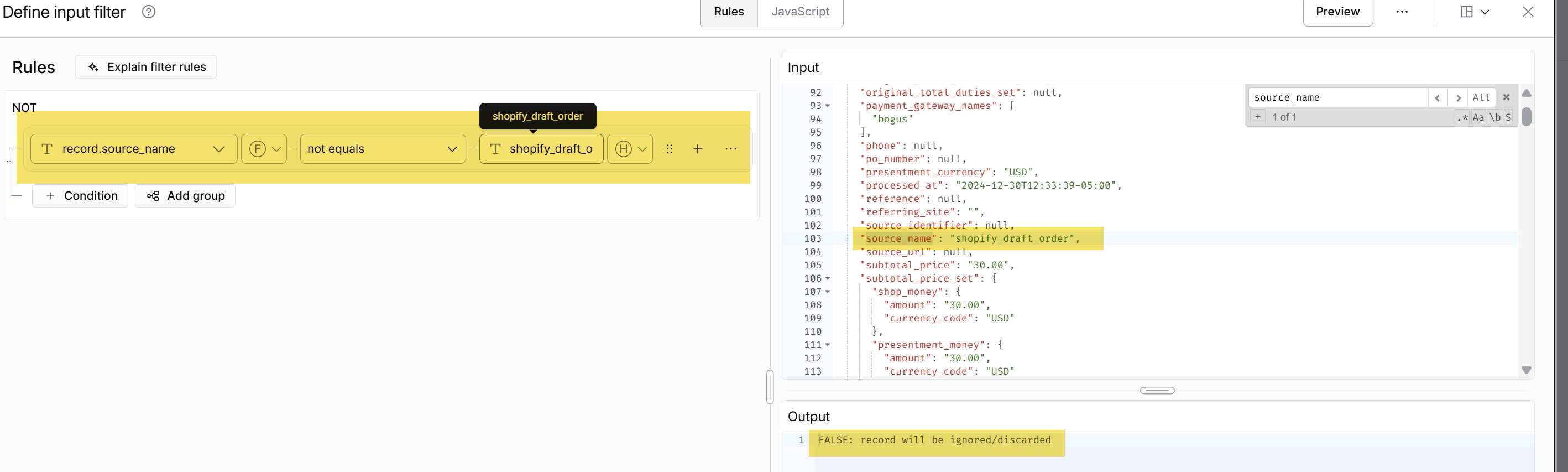
I checked and created a draft order in our test account, then marked it as paid. When accessing the order JSON, the source_name was set to ‘shopify_draft_order’. If this matches your orders, you can filter your flow by doing the following:
-
Open your Shopify to NetSuite order flow and access the Flow Builder.
-
Navigate to the step: Post Orders to NetSuite.Click the three dots icon and select the option to Input Filter
-
Copy the same value for the condition below:
You’ll also notice that when previewing the data, if the source_name is equal to “shopify_draft_order,” then the order should be ignored.

Note: To access your order JSON, add ‘.json’ to your order URL just like below:

Let me know how it goes. Also, you may refer to this article on how to apply filters to your flows: Apply filters