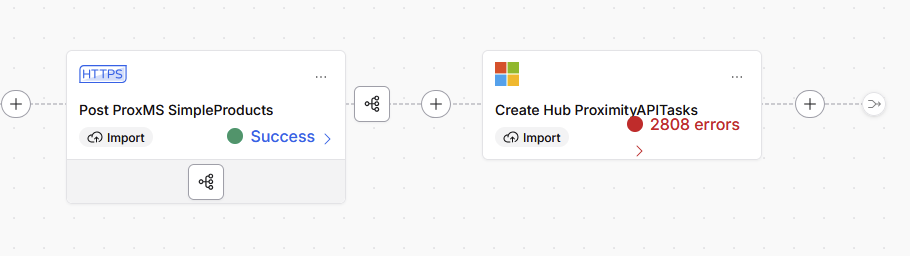
I am trying to send multiple records per HTTP POST in an import step. I have set the “number of records per HTTP request” to 999, and I have set the “path to records” (= data) and “path to id field” (= data.id). I am using the normal field mapping dialog (Mapper 2.0, with “create destination record from source record”).
The issue is that the resulting body needs to look like this:
{
   "data": [
      { record data here },
      { 2nd record data here }
   ]
}
How do I get the import to wrap the records array under the “data” tag?
One more related issue. In the next step I want to capture some info from the batch HTTP response. It may send a few thousand records in the HTTP request, but I just want to capture a few field values in a SQL table. I captured the response fields in the response mapping. I have set the step to “Use SQL query on the first page only”. Everything looks like it should work in the SQL preview window.
I have 2 issues. First I am getting 2808 errors, when I would expect to only execute the SQL statement once (at most 1 error). Second, when it runs it tells me that taskId is not defined in the model.
However, when I run it I get 2808 failures that say the taskId is not part of the model. I would expect at most 1 error, and taskId works fine in the preview.
Much more clear thanks Jim. When running the "Use SQL query on the first page only", it's a batch so when we get a failure from the batch, we apply the failure to all records within the batch. We are wanting to enhance error management so this sort of thing could then be grouped in the UI and be more manageable (@priyankakoundal is working on this).
As for why you're even getting the error, can you share the record payload of one of the errors? Is task id there and in all of them?
I had “data” in the path to records in the response body. That’s really the path to records in the request body. There is no wrapper object in the response body.
However, if I remove it, I get 2808 errors that say “The size of the response has exceeded 5242880 bytes, please try adjusting BATCH SIZE or try configuring "Path to records in HTTP response body"“
It’s a strange async API that I am POSTing to, that doesn’t return any info about the individual record operations. It only returns a few fields to identify the batch. You need to call back in several minutes later to get any errors regarding the record failures.
Celigo seems to be trying to tie the response contents back to each request record.
We've made the Path to records in HTTP response body setting optional when batching.
If the endpoint returns per-record responses, set the path so Celigo can map responses back to the right records in _json for use in postSubmit scripts and response mappings.
If the endpoint doesn’t return per-record responses, you can leave the path blank and Celigo will still populate _json with the full response.
If the response size is too large or the response count doesn’t match the request count, Celigo will apply the response to all records and prompt you to adjust configuration if needed.
For some reason though putting this response for each record is ballooning something which doesn't seem right.
I agree! The response returned is tiny, and shouldn’t cause any issues. Even if the 3 fields returned are duplicated on every record, it still seems like it should work fine with only 2800 records.
Please ask the doc and UI team to update the doc and the pop ups (off the ?) in the UI.
When you fetch the status of the taskId, does the API have a way to also fetch the results? I imagine some records sent may fail and others may be fine so they'd give some way for you to check?
It looks like I am running into a size limit. I set the page size on my export to 1500, and I set the number of records per HTTP request to 1500 as well, and it runs without errors. It does 2 HTTP POSTs, gets a response back for each, and I set the last logging step to run once per page, so I capture the taskIds for each POST!
That leaves me with only 1 challenge. I need to pass a header value of refreshAll = true for the 1st page, but false for all subsequent pages? Any suggestions for the best way to do that, without a separate flow, and hopefully without a duplicated HTTPS step?
It's interesting that you were so close to the page limit, where only three more fields set it over 5MB. Here are some ideas:
You could use a postSubmit script on the HTTP import and remove the _json from every responseData object except for the first one. At that point, only the first record would get its response mapped back, and you shouldn't hit the page limit.
To avoid errors being thrown for all records, you could add an input filter on the MS SQL import to only process records where taskId is not empty. Since only one record would have it, then it would only run that one record, and if an error occurred, it would throw for just that error.
Given that you were already close to the limit and assuming the source record count could grow in the future, setting a smaller page size makes sense to do anyways.
If you do set a smaller page size and proceed with the input filter idea, then you'd probably have to change the query to "Run once per page of records" instead of just the first page.
Since you need to send refreshAll for the first page, but not for other pages, you can use a preSavePage script on your export to reference the pageIndex field, and if it's equal to zero, then add a flag to your records for that page.