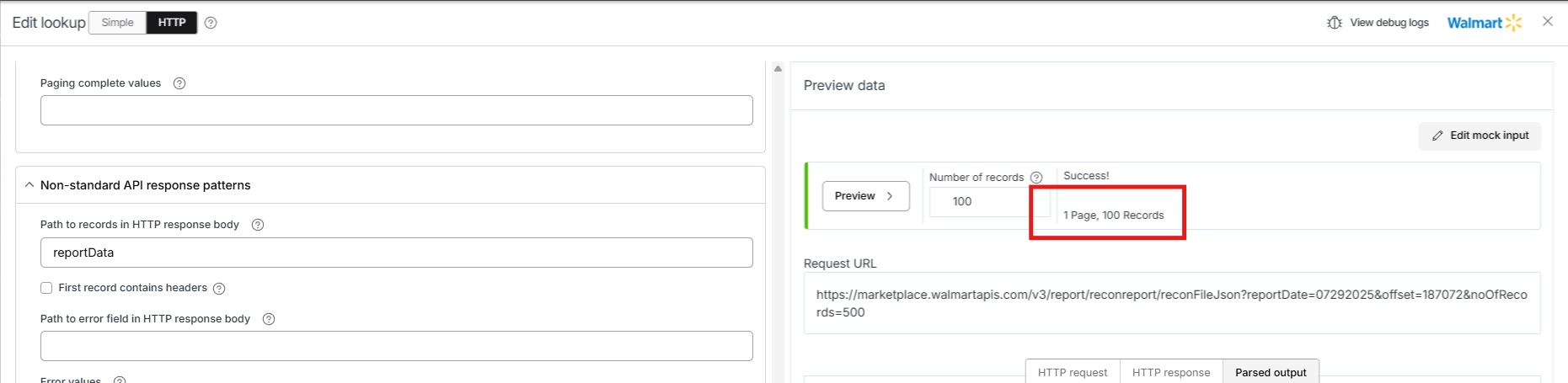
I’m using a Lookup step and the HTTP response contains ~2,000+ data. In the run results it shows as a single successful record. I set the path to records in HTTP response body and when I preview they show up as individual records.
The "1" you see there just means that the single source record successfully ran. It doesn't indicate how many results were returned from the lookup response (that's why you see "1" for export and "1" for lookup). In the next NetSuite step, you have 2405 successes, so I assume your response mapped data to something and then used a one-to-many setting on the NetSuite step. The one-to-many setting individually processes those records in the specified array.
Thanks for the explanation. Yes, I mapped the response data and used it in a one-to-many import. Just to confirm, would the lookup still be safe from the Celigo 5MB limit in this case?
It would not. The way this is set up could hit the 5 MB page size limit. Essentially, what you’re wanting is to change the context of your flow after the lookup to "re-recordize." By that, I mean you want the results of the lookup to now be the records going forward through the flow. We don’t have this functionality yet, but it’s one of the main 5 MB limitations we are looking to solve soon-ish.
To avoid it for now:
Filter out lookup results that you don’t need.
Transform the data to remove fields you don’t need.
Make field names smaller so fewer bytes take up space on the page.
Could you also share what Walmart apis and reports you are grabbing? I'm wondering if an async helper could be used here which would also work to avoid the 5 MB limit.
Hi @tylerlamparter I think I’m all set with your suggestion to use a second flow with a listener. Would it be possible for the listener to batch the records into 100 before sending them to the next step? I’ve noticed that by default, each page only contains 20 records. I also tried increasing the export page size, but it seems the listener doesn’t follow that setting.