One to many then back from many to one

Hello all.

I have a webhook listening process that needs to achieve the following. Each webhook event will receive details regarding an order. I need to do a lookup into another system to get the list of associated shipments - 1 API call. I then need to get additional details for each shipment - one API call per shipment. Once all the details are gathered for the shipments, I need to aggregate the individual shipment data into order-level info and make a single call back to another system at the order level.

So far, I’ve captured the list of shipments in one step and then, using a One-To-Many step, I have shipment details available for each shipment - (N shipment records per order). What is the best approach to consolidate the many invoice records back to the single parent order record?

What data do you need to bring to the order level? You'd need some sort of aggregation to bring things like count of shipments, sum of shipment costs, concatenation of tracking numbers, etc.

Let’s use one of your examples - list of tracking numbers. Each of the one-to-many records will retrieve it’s own tracking_number context. I’m assuming that I need to push each child record’s data into the _PARENT somewhere- incrementally building the list in the ā€˜global order’ context. What I don’t see is how best to trigger the next stage - all track numbers have been captured and it’s time for the next stage to provide the full tracking number list. Do I have to manually track progress on which shipments have processed in the _PARENT context. Is there a foreach-child concept for the flows?

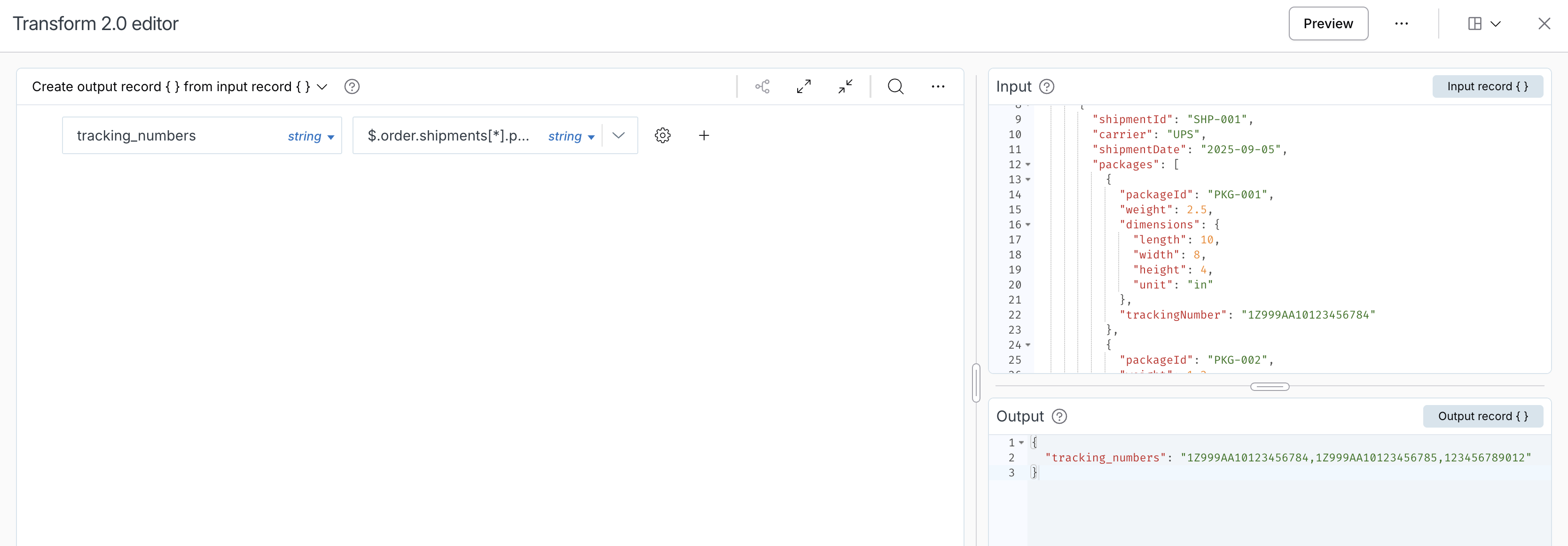
In this example, you might just be able to use mapper 2.0 when you need to send them to your final destination (I'm not sure where you are going with this data).

Mapping:
$.order.shipments[*].packages[*].trackingNumber

Sample data:

{
  "order": {
    "orderId": "123456",
    "customerId": "987654",
    "orderDate": "2025-09-04",
    "status": "Shipped",
    "shipments": [
      {
        "shipmentId": "SHP-001",
        "carrier": "UPS",
        "shipmentDate": "2025-09-05",
        "packages": [
          {
            "packageId": "PKG-001",
            "weight": 2.5,
            "dimensions": {
              "length": 10,
              "width": 8,
              "height": 4,
              "unit": "in"
            },
            "trackingNumber": "1Z999AA10123456784"
          },
          {
            "packageId": "PKG-002",
            "weight": 1.2,
            "dimensions": {
              "length": 6,
              "width": 6,
              "height": 6,
              "unit": "in"
            },
            "trackingNumber": "1Z999AA10123456785"
          }
        ]
      },
      {
        "shipmentId": "SHP-002",
        "carrier": "FedEx",
        "shipmentDate": "2025-09-06",
        "packages": [
          {
            "packageId": "PKG-003",
            "weight": 5.0,
            "dimensions": {
              "length": 15,
              "width": 10,
              "height": 8,
              "unit": "in"
            },
            "trackingNumber": "123456789012"
          }
        ]
      }
    ]
  }
}

You could also use handlebars later within mapper 1.0, mapper 2.0, or some other AFE editor where you need this.

{{#each order.shipments}}{{#each packages}}{{trackingNumber}}{{^if @last}},{{/if}}{{/each}}{{^if @last}},{{/if}}{{/each}}

Thanks for this but I think I’ve not described the issue correctly. I’m being non-specific with the data itself because I’m just looking for the conceptual solution. That said, I’ll try to be more detailed with the question.

I currently have 3 steps so far.

First step is a webhook listener. For brevity let’s say it’s output is simply

{
    "orderNumber": 123456
}

The second step calls out to an API to get the list of the order’s shipments. that call runs once. The output of the call is pushed into the record like so.

{
    "orderNumber": 123456,
    "shipments": [
        {
            "shipmentId": "SHP-001"
        },
        {
            "shipmentId": "SHP-002"
        }
    ]
}

The third step is using the ā€œPath to manyā€ feature to point to the shipments array and make an API call to get the tracking number for each shipment. In this case we have 2 shipmentIds so this step runs twice. It’s at this point that I have 2 records for the 3rd step: each with it’s own trackingNumber results from calling the getTracking API for each shipmentID. Each of those records appears to be working with something that looks like this.

{"shipmentId": "SHP-001"," _PARENT": {ā€œorderNumberā€: 123456}}
{"shipmentId": "SHP-002", "_PARENT": {ā€œorderNumberā€: 123456}}

This is where I assume that I’d need to push each tracking number up into the _PARENT entity.

The first half of the battle is that I’d like to get to the point where I have ONE record that looks like this after the two getTracking API calls.

{
    "orderNumber": 123456,
    "shipments": [
        {
            "shipmentId": "SHP-001",
            "tracking": "TRK-01"
        },
        {
            "shipmentId": "SHP-002",
            "tracking": "TRK-02"
        }
    ]
}

The ultimate goal being, I can have a 4th step that runs ONCE using the above data for it’s call - no matter how many shipments/tracking numbers the order may ultimately have.
Gotcha, so the second call doesn't get you the actual detail you need for the shipments, just the list of shipments themselves. In your third step, you're getting the detail of each shipment and then just need to map the results back. To do that, just use the result mapper like you did in your second step, and it will map the result of each child into each child. So in your case, you'd do something like data.0 mapped to shipmentDetails, which would give you this:

{
    "orderNumber": 123456,
    "shipments": [
        {
            "shipmentId": "SHP-001",
            "shipmentDetails": {
                "tracking": "TRK-01"
            }
        },
        {
            "shipmentId": "SHP-002",
            "shipmentDetails": {
                "tracking": "TRK-02"
            }
        }
    ]
}

The reason for mapping to data.0 is because I suspect your lookup in this case will only ever result in one result per shipment. If you had a case where multiple results were returned per shipment, then you would just map to data.

Hey @tylerlamparter

After doing that, what I see in the preMap hook of the 4th step is 2 separate records that look like the below. I don’t know how to consolidate the two records back to one with a singular view of the data.

{"shipmentId": "SHP-001", "shipmentDetails": { "tracking": "TRK-01" },

"_PARENT": {"orderNumber": 123456}}

{"shipmentId": "SHP-002", "shipmentDetails": { "tracking": "TRK-02" }

"_PARENT": {"orderNumber": 123456}}

Are you also using one to many on your 4th step? You only get _PARENT when using one to many.

Thanks so much @tylerlamparter!

That was my issue all along. I hadn’t realized my stage 4 was also set up with a ā€œpath to manyā€. As soon as I disabled that, the stage went to 1 record with a nicely condensed message with everything I needed.

thanks again!

1 Like