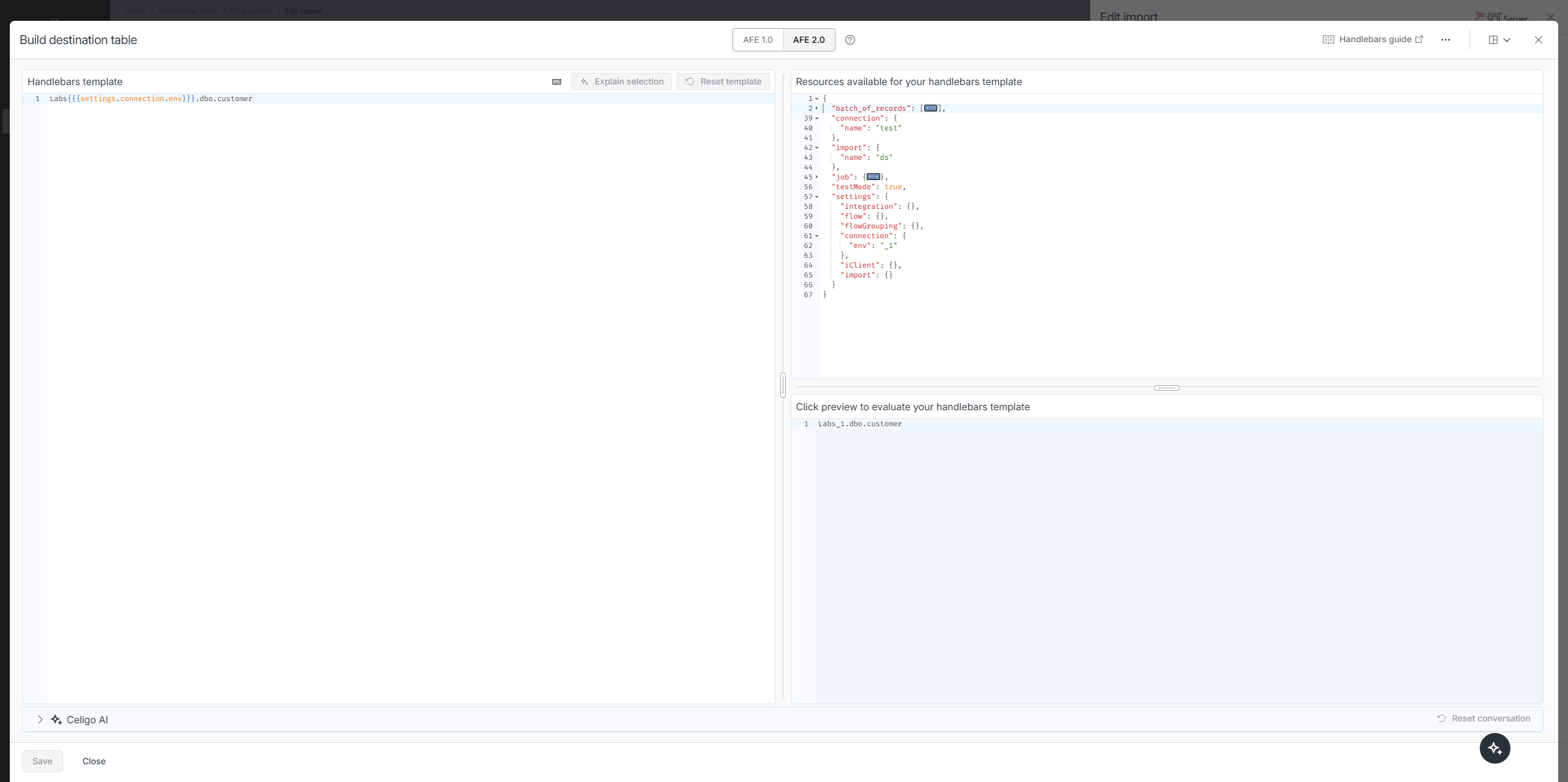
I just did the Office Hours meeting and asked about how to use different schemas between Sandbox and Prod (for database Connections). For instance, I have a table called ipaas_dev (for Sandbox) and ipaas (for Prod). I want a simple way that adds _dev for sandbox. In the past I did this via Integration Settings, and it worked for one upload, but then it wouldn’t work after that (I don’t recall the error but it made me start over). Regardless, the suggestion from Office Hours was to add this to the Connection Custom Settings:
{
    "env": "_dev"
}
Then refer to it as FROM [ipaas{{{settings.connection.env}}}].[users].
That works for Lookups, but for Imports when using “Use bulk insert SQL query (recommended)” at least, this throws an error (as if it is now looking for a temp table??):
Cannot find column metadata for table #[coinsuigLIVE].[ipaas_dev].[users]
Not sure if there is a way around this? I have added/removed the square brackets, but that had no affect. Please advise and Thank you.
I think that's only a preview error due to the handlebars not being evaluated prior to attempting to fetch table metadata for mapper. Can you verify it works fine for runtime?
That error is what appears when it is run. It looks like it thinks it is a temp table, unless “#” means something else than I’m accustomed to …
Same thing works though if you just hardcode in _dev?
Correct, I usually don’t have the data bracketed, but it works just fine with ipaas_dev. … It’s like when it sees the {{{ it changes it’s MO.
I just tested in my environment and it's working fine. I'd suggest making a ticket so support can troubleshoot further.
It works when previewing in the handlebars editor for us also. Were you able to get it to actually run the flow and work?
Yeah it worked in preview and runtime for me.
I’m getting this error when inserting data into a table in MS-SQL. The error says “Cannot find column metadata for table #[dbo].[United States Bakery$DSD Load Adjustment Staging]”. Is this thing still an issue?
In order to get this working:
- Connections → (Select/Create your connection)
- Custom Settings → Launch form builder
- Update form builder (This is what my form builder looks like) for form
_dev in Sandbox and since my table has no suffix in Prod, the form name is blank in Prod:
{
  "fieldMap": {
    "Product Title": {
      "id": "Environment",
      "name": "Environment",
      "type": "text",
      "label": "Environment",
      "helpText": "Environment",
      "required": false
    }
  }
}
4a. When referencing the table, if inside SQL: from [ipaas{{{settings.connection.Environment}}}].[table_name] (brackets are optional), this would give me [ipaas_dev] in Sandbox and [ipaas] in Prod.
4b. If this is a Destination table in Celigo, you CANNOT use brackets, mine looks like databasename.ipaas{{{settings.connection.Environment}}}.table_nameyou won’t be able to see anything in preview, etc. so I would suggest hardcoding it to set-up any Mapping and then changing it to the above option so you can see your actual table names.
Is this a great solution? Not really. Does it work? Yes.