# Shopify GraphQL
**URL:** https://connective.celigo.com/t/shopify-graphql/764
**Category:** Integrator.io
**Tags:** graphql, json, shopify
**Created:** [May 19, 2022, 3:57pm UTC](https://connective.celigo.com/t/shopify-graphql/764 "2022-05-19T15:57:46Z")
**Posts on this page:** 9
**Page:** 1
### Author:  [@pangaiaadmin](https://connective.celigo.com/u/pangaiaadmin)
#### Post date: [May 19, 2022, 3:57pm UTC](https://connective.celigo.com/t/shopify-graphql/764/1 "2022-05-19T15:57:46Z")
Hi,
Has anyone successfully connected to Shopify via GraphQL? We're trying to use the PriceLists query
[https://shopify.dev/api/admin-graphql/2022-04/queries/priceLists](https://shopify.dev/api/admin-graphql/2022-04/queries/priceLists)
to query and update International Prices (which are only accessible in Shopify via GraphQL and not the REST API).
If so, would you be happy to share the json and how you entered it?
Many Thanks,
Stew
---
### Author:  [@viliandyleonardo](https://connective.celigo.com/u/viliandyleonardo)
#### Post date: [May 19, 2022, 4:17pm UTC](https://connective.celigo.com/t/shopify-graphql/764/2 "2022-05-19T16:17:06Z")
Hi @pangaiaadmin
We have GraphQL connector that you can use to set up integration with a Shopify GraphQL endpoint. Here is the kb for setting up a connection: [https://docs.celigo.com/hc/en-us/articles/4843857027227](https://docs.celigo.com/hc/en-us/articles/4843857027227)
Here is an example of value for the base URI in the connection:

And to test the connection, here is an example of the query:

In the export step, you can then build the GraphQL queries - see below for example:

```
query ($var: Int!) { customers(first: $var, query:"accepts_marketing:true" {{#if export.http.paging.token}}, after: "{{export.http.paging.token}}" {{/if}}) { pageInfo {hasNextPage endCursor} edges { node {id,firstName,lastName} } }}
```
The above example uses the following pagination set up
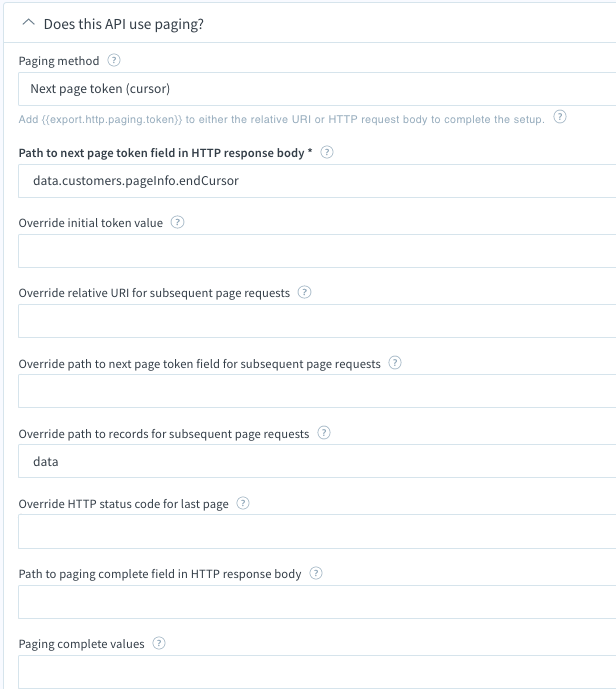
Thanks
---
### Author:  [@pangaiaadmin](https://connective.celigo.com/u/pangaiaadmin)
#### Post date: [May 20, 2022, 12:01pm UTC](https://connective.celigo.com/t/shopify-graphql/764/3 "2022-05-20T12:01:54Z")
Hi,
Thanks for the quick response. I can connect OK to the GraphQL but when we try to preview the export we still get a syntax error even though I have copied and pasted the code above in (I think).
Here's the syntax error:
{
"errors": [
{
"message": "Parse error on \"query\" (STRING) at [1, 2]",
"locations": [
{
"line": 1,
"column": 2
}
]
}
]
}
and here's the config:

I have noticed a ‘/’ at the end of the request URL - might that be causing issues? How would I remove that?
Thanks,
Stewart
---
### Author:  [@viliandyleonardo](https://connective.celigo.com/u/viliandyleonardo)
#### Post date: [May 20, 2022, 5:10pm UTC](https://connective.celigo.com/t/shopify-graphql/764/4 "2022-05-20T17:10:25Z")
@pangaiaadmin
Your screenshot shows the preview is successful, though it returns 0 record. If you click on the parsed output tab, you'll see the records.
Where do you see the syntax error message?

Thanks
---
### Author:  [@pangaiaadmin](https://connective.celigo.com/u/pangaiaadmin)
#### Post date: [May 20, 2022, 6:44pm UTC](https://connective.celigo.com/t/shopify-graphql/764/5 "2022-05-20T18:44:56Z")
Hi Viliandy, we see the syntax error here:

There doesn't seem to be anything in the parsed output (I tried it with accepts marketing true and false in case that was the issue).

Thanks,
Stewart
---
### Author:  [@viliandyleonardo](https://connective.celigo.com/u/viliandyleonardo)
#### Post date: [May 20, 2022, 9:09pm UTC](https://connective.celigo.com/t/shopify-graphql/764/6 "2022-05-20T21:09:13Z")
@pangaiaadmin
I cannot tell where the syntax issue is at. I suggest you start with a simple query then build up to a more complex query that uses variables etc, then include pagination. Here is 1 example of a simple query asking for first 10 customer records. If you can't get the simple example below to return records (assuming you have customer records), then please log a support ticket so we can help you further. Thanks
> { customers(first: 10) { edges { node { id } } }}

---
### Author:  [@pangaiaadmin](https://connective.celigo.com/u/pangaiaadmin)
#### Post date: [May 22, 2022, 9:27pm UTC](https://connective.celigo.com/t/shopify-graphql/764/7 "2022-05-22T21:27:38Z")
Hi,
I tried this using the integrator.io instance and it worked fine.
However, it doesn't seem to work on the eu.integrator.io instance - so maybe the issue is to do with that? I noticed that the UI looks different as well - the eu.integrator.io instance has a section for Request URL which integrator.io didn't seem to. Would you be able to get someone to look into that please?
Thanks,
Stewart
---
### Author:  [@viliandyleonardo](https://connective.celigo.com/u/viliandyleonardo)
#### Post date: [May 23, 2022, 3:21pm UTC](https://connective.celigo.com/t/shopify-graphql/764/8 "2022-05-23T15:21:54Z")
@pangaiaadmin
Hi Stewart, I noted that you logged a support ticket for eu.integrator.io instance question and a support has accepted your ticket. Support team will follow up with your question via the support ticket.
Thank you
---
### Author:  [@viliandyleonardo](https://connective.celigo.com/u/viliandyleonardo)
#### Post date: [May 25, 2022, 7:44pm UTC](https://connective.celigo.com/t/shopify-graphql/764/9 "2022-05-25T19:44:09Z")
@pangaiaadmin
Hi Steve, fyi, we just published this guide to help with building the GraphQL request on our connector. [https://docs.celigo.com/hc/en-us/articles/6177684981787-Build-GraphQL-queries](https://docs.celigo.com/hc/en-us/articles/6177684981787-Build-GraphQL-queries)
Thanks